PORTAL Screen |
Purpose |
The PORTAL screen is the gateway to the Texas Immunization Registry. In addition to accessing ImmTrac2, the portal also provides users access to important forms, hot topics, contact information, related links and various menu links (based on access privileges of the user) .
Described below is the required information for access as well as other provided information on the portal screen.
Selecting an Application |
Once you select an application you will be presented a list of organizations you have access to. Your list of applications may be limited due to your access privileges.
Clicking on an organization hyperlink will take you into the ImmTrac2 registry for that organization. Your privileges inside the registry are based on the role your administrator chose during set up of your user account.
Organization Search and Soft Access |
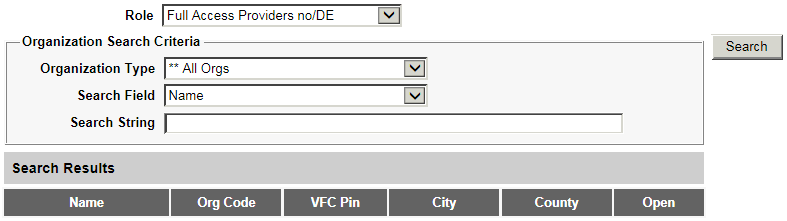
This screen lets authorized users to log into different organizations under different roles.
Using the drop down menu, choose the appropriate role
Using the drop down menu, choose the appropriate Organization Type
From the Search Field drop down menu, select the criteria you want to use to search for an organization.
In the Search String box, type in the corresponding value for the search criteria. For example, if you selected Org code in the Search field type in the Org code in the Search String box.
Click Search to search for the organization
From your search results select the hyperlink for the organization to go into the registry of that organization as the user role that was selected in the Role drop down menu.
For example, if you select Provider Supervisor (with DX) in the Role drop down menu and the search results show Brazo's Clinic organization, selecting the hyperlink to this organization will let you access the registry for Brazo's Clinic as a Provider Supervisor (with DX) user.
Notes
Organization search and login through soft access is available users with higher privileges.