Allows an organization to select different options of what each ImmTrac2 user will view.
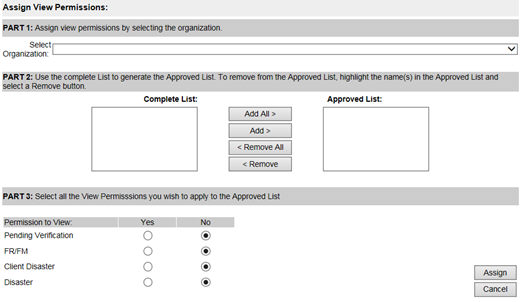
- From the drop-down menu, select the organization in which you need to make changes
- All users associated with the selected organization, will appear on the left side data box titled "Complete List". You can either add all or select individual names by highlighting the name and clicking on the add button
- Selecting “Yes” will give the users on the “Approved List” access to view those particular ImmTrac2 clients. Selecting “No” will prevent the users on the “Approved List” from seeing those ImmTrac2 clients. When done making your selections, click Assign OR If you change your mind, click Cancel.